Do you know the specific applications of card socket connectors in the field of docking stations?
- Share
- Issue Time
- Mar 12,2025
Summary
Card connectors play a critical role in docking stations, primarily for interface expansion, signal transmission, and structural design. Below are their specific applications and technical features
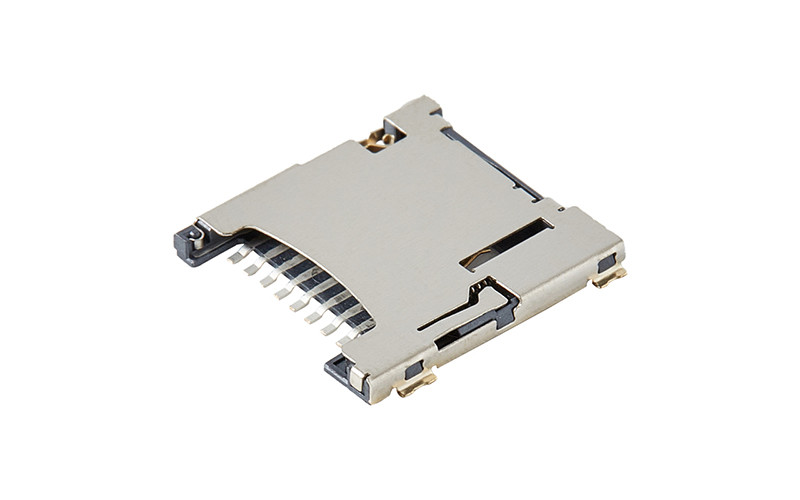
A docking station is a density problem: a dozen interfaces in a housing the size of a paperback. The card socket is one of the smaller functions inside it, but it is the one users judge first — the SD slot is why many people buy the dock. This article covers what the card connector actually contributes to a dock, where it is often wrongly credited, and what to specify.
What the Card Socket Actually Does in a Dock
Three things, and only three: it makes electrical contact with the card, it holds the card in position, and it signals the host when a card is present. Everything else in a dock — video output, Ethernet, USB ports, charging — is handled by other connectors and other chips. Understanding this boundary makes the specification much shorter and prevents a common mistake in product literature, where a dock's card reader is described as if the socket also carried HDMI or network traffic.
The Card Reader Function: SD and microSD Slots
A dock's card reader is normally a UHS-I implementation: an SD 3.0 or microSD socket, a bridge chip, and a USB or PCIe uplink to the host. Practical throughput is up to around 104MB/s on UHS-I, and the reader is usually limited by the bridge chip rather than by the connector — which is worth knowing before paying for a UHS-II socket.
Two socket-level details decide whether the reader feels good. The first is card detection: a dock that has to be re-plugged after inserting a card has a detection problem, not a software problem. The second is the mechanism — push-push is standard in a dock because the card must be inserted with one hand while the dock sits on a desk, and because a protruding card is a hazard in a laptop bag.
Where the Card Socket Is Not the Connector
Dock specifications routinely blur this, so it is worth stating plainly. USB-A and USB-C ports use USB connectors. HDMI and DisplayPort outputs use video connectors. Gigabit Ethernet uses an RJ45 jack with integrated magnetics. The USB-C upstream port and the PD power path use a USB-C receptacle rated for the current the dock passes through. None of these is a card socket, and none of their requirements — 5Gbps to 10Gbps signalling, 4K or 8K video, 100W power delivery — should appear on a card connector datasheet.
What the card socket does contribute to those functions is board area and thermal budget: every interface in a dock competes for the same PCB, and a smaller socket leaves room for the video and power stages that generate the heat.
Density and Layout Inside a Dock
Height is the binding constraint in a dock, not footprint. A 1.28mm microSD socket and a 2.94mm full-size SD socket differ by more than a millimetre, which in a 15mm-thick aluminium housing is the difference between a stacked layout and a single-sided one. Most docks use microSD on the main board and place the full-size SD socket on a daughter card or at the edge where the housing has room.
Board-level pitch matters too. Card sockets sit next to 0.5mm-pitch connectors for the upstream link and often 0.3mm board-to-board parts, so stencil design and reflow profile have to satisfy the tightest part on the panel. Coplanarity on the card socket is easy to overlook in that mix and expensive to discover at AOI.
Power and Thermal Reality
A dock that passes 100W of USB-C Power Delivery generates real heat, and the card reader sits in the same enclosure. The card socket itself carries only the card's supply current — tens of milliamps — so the thermal question is not about the connector's rating but about its environment: a socket placed next to the PD controller runs warmer than its datasheet condition, and contact resistance rises with temperature.
Two practical measures: keep the card socket away from the switching regulator and the PD front end, and specify a connector rated above the enclosure's internal ambient rather than at room temperature. A part rated to 80°C is the right choice for a passively cooled aluminium dock.
Durability Requirements for a Dock
A dock sees more card insertions than a phone, because it is the device people use to offload photographs. A high-quality socket rated at 10,000 cycles covers years of daily use with margin. What fails first is usually not the data contacts but the detect switch and the eject mechanism, so both need their own cycle specification.
Mechanical robustness matters as much as cycle life in a portable dock: it gets carried in a bag, dropped on a desk, and plugged in with the cable under tension. Retention force under shock is the number that decides whether the card stays seated, and shell grounding at every tab is what keeps ESD from the slot out of the bridge chip.
What to Specify
- Card format and mechanism: microSD push-push at 1.28 to 1.6mm for thin docks; full-size SD push-push at 2.94 to 3.58mm where the housing allows.
- Interface: UHS-I unless the product claims SD Express, in which case the second contact row must be specified before layout.
- Contact resistance: 30mΩ max with 0.025µm gold over nickel, measured across the operating temperature range.
- Card detection: hardware detect contact, with a defined mating sequence so hot-swap works without polling.
- Life: 10,000 cycles on both the data contacts and the detect switch.
MOARCONN supplies SD and microSD card connectors for docking stations and card readers, with 0 MOQ, 7-day sampling and a 25-day development cycle for housing modifications.
Docking Station Card Connector FAQ
Does the card socket limit my dock's transfer speed?
Rarely. On a UHS-I design the bridge chip and the USB uplink set the ceiling, and the socket is transparent below about 100MB/s. The socket becomes the limit only when you claim UHS-II or SD Express speeds without the second contact row and the controlled-impedance layout that goes with it.
Can one socket support both SD and microSD?
No — the two cards have different dimensions, different contact counts and different heights. Docks that support both use two sockets or a mechanical adapter tray, and the tray approach usually compromises retention. Two sockets are the honest solution.
Why do docks fail at the detect switch first?
Because the detect contact has its own spring, its own wear rate and usually no cycle specification. It is also the contact most exposed to dust and to cards inserted at an angle. Specify its cycle rating separately from the data contacts and check it in the drop test.
MOARCONN Quality Anchors
Every MOARCONN card socket connector is validated to 10,000 mating cycles (tested to GB/T 5095.7-1997; over 2× the 3,000–5,000 cycles common in the industry), operates from -45°C to 80°C, and ships with contact resistance ≤30mΩ thanks to ≥0.025µm gold-plated phosphor-bronze terminals. IATF 16949 certified production supports 0 MOQ orders with 7-day sampling and a 25-day development cycle — backed by in-house mold, stamping and injection molding factories and 32 granted patents.