SD Card Connectors: Pinout, Types, and PCB Design Guide for Engineers
- Share
- publisher
- MOARCONN
- Issue Time
- Oct 22,2026
Summary
Explore SD card connector types, pinouts, PCB design tips, and selection guidelines for reliable electronic applications.
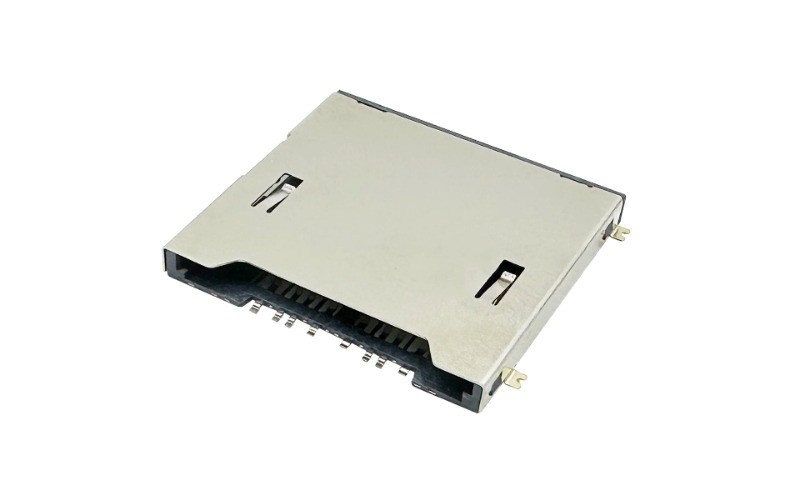
SD Card Connectors: Pinout, Types, and PCB Design Guide for Engineers
SD card connectors are essential components in electronic devices that require removable storage. From industrial control systems and security cameras to embedded computers, drones, and portable electronics, the right connector helps establish a reliable electrical and mechanical interface between an SD card and the host device.
However, selecting an SD card connector involves more than matching the card size. Engineers must also consider contact configuration, insertion mechanism, mounting direction, PCB footprint, available space, signal requirements, and expected operating conditions.
In this engineering guide, we explain the major types of SD card connectors, how to understand their pinouts, what to check during PCB design, and how to select a connector that meets your application's requirements.
Whether you are developing a new PCB or replacing an existing socket, this guide provides a practical starting point for evaluating SD card connector solutions.
Looking for a suitable connector for your next design? Explore Moarconn SD Card Connectors to compare available configurations and identify options for your application.
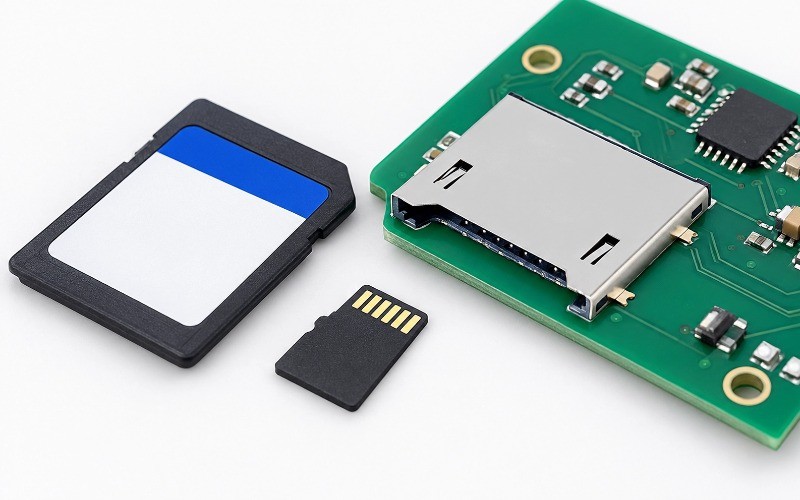
1. What Is an SD Card Connector?
An SD card connector is an electromechanical component mounted in an electronic device to connect a compatible Secure Digital (SD) memory card to the host circuit.
The connector contains conductive contacts that mate with the contact pads on the card. These contacts carry power, ground, clock, command, and data signals according to the supported interface. Depending on the connector design, additional mechanical switches may detect card insertion or support other device functions.
SD card connectors are commonly used in:
Industrial equipment and embedded computing systems
Security cameras and video recording devices
Digital cameras and portable imaging equipment
Drones and other data-logging devices
Card readers, docking stations, and consumer electronics
IoT products that require removable storage
SD Card vs. SD Card Connector
An SD card stores digital information. An SD card connector provides the physical and electrical interface through which a host device accesses that information.
The two components must be compatible in card format, contact arrangement, and supported interface requirements.
A connector that fits mechanically is not necessarily suitable for every SD card application. Engineers must also verify the connector's electrical characteristics and the interface supported by the host device.
Why Connector Selection Matters
A poorly selected connector can introduce unnecessary mechanical constraints, assembly difficulties, contact reliability issues, or electrical performance limitations.
The appropriate connector should match the product's enclosure, PCB layout, operating environment, card insertion frequency, and intended data interface.
Moarconn develops and manufactures card socket connectors, including SD and microSD connector solutions. Its product range includes different mounting configurations and insertion mechanisms to support a variety of electronic designs.
For available configurations, see the Moarconn SD Card Connector product range.
2. Types of SD Card Connectors
SD card connectors are available in several configurations. The best choice depends on the required card format, product dimensions, user interaction, PCB assembly process, and mechanical environment.
2.1 Standard SD vs. microSD Card Connectors
The first selection step is to identify the required card format.
Standard SD connectors accommodate full-size SD cards. They may be suitable for products where the available space and card handling requirements allow a larger socket.
microSD connectors accommodate smaller microSD cards. Their compact footprint makes them useful in space-constrained devices such as cameras, drones, compact embedded systems, and portable electronics.
The card format determines the physical interface. A standard SD card and a microSD card cannot be treated as interchangeable connector formats without an appropriate adapter or a different mechanical design.
When selecting a connector, verify the card format and the manufacturer's recommended mechanical drawing rather than relying on product photographs alone.
2.2 Push-Push SD Card Connectors
A push-push connector uses a spring-loaded mechanism. The card is pushed into the socket to engage the retention mechanism and pushed again to release it.
Typical considerations include:
Convenient insertion and ejection
Suitable operation where users frequently remove cards
Internal mechanism height and required operating clearance
Mechanical endurance over repeated insertion cycles
The mechanism should be evaluated against the enclosure design and the application's expected usage.
2.3 Push-Pull SD Card Connectors
A push-pull connector allows the user to insert and remove the card by pushing it into the socket and pulling it out.
Potential advantages include a straightforward operating mechanism and design flexibility. However, removal access, card retention, and the space needed for the user's fingers or a tool should be evaluated in the complete product.
2.4 Hinged and Other Retention Designs
Some memory card connectors use a hinged cover or other retention mechanism to hold the card in position.
These designs may be worth evaluating when card retention and mechanical stability are important. The suitability of a particular mechanism depends on the connector's actual construction and the application's vibration, shock, and service requirements.
Do not assume that a particular insertion mechanism automatically meets a specific durability or vibration requirement. Confirm the manufacturer's specifications and test the assembled product under its intended conditions.
2.5 Top-Mount vs. Bottom-Mount Connectors
Mounting orientation affects PCB layout, card insertion direction, component height, and enclosure clearance.
Top-mount: The connector is installed on the top side of the PCB according to its specified footprint.
Bottom-mount: The connector is designed for installation on the bottom side of the PCB.
Low-profile designs: These can help reduce the space occupied by the connector, subject to the actual component dimensions and mechanical requirements.
Always check the recommended PCB layout and mechanical drawing. A connector's mounting description alone does not establish its full clearance or compatibility with a particular board.
3. SD Card Connector Pinout Explained
Understanding the SD card connector pinout is essential before creating a schematic, assigning MCU pins, or laying out the PCB.
A pinout identifies the electrical function of each card contact or connector terminal. However, the card contact number and the socket terminal number are not necessarily interchangeable. Their relationship must be verified using the specific connector's datasheet.
3.1 Common microSD Card Contact Functions
A conventional microSD card has eight standard contacts. The table below describes their common signal functions in SD and SPI operating modes.
| Contact | SD interface signal | Function in SPI mode |
| 1 | DAT2 | Data line 2; not normally used as a standard SPI data signal |
2 | DAT3 | Commonly used as CS (chip select) |
3 | CMD | Command signal; MOSI |
4 | VDD | Power supply |
5 | CLK | Clock |
6 | VSS | Ground |
| 7 | DAT0 | Data line 0; MISO |
| 8 | DAT1 | Data line 1; not normally used as a standard SPI data signal |
This table is a general reference for a conventional microSD card interface. It is not a substitute for the card standard, host-controller documentation, or the connector manufacturer's terminal drawing.
For example, a socket may include extra mechanical terminals for card detection. These are connector switch terminals rather than additional standard microSD card contacts.
3.2 SD Bus Mode vs. SPI Mode
SD memory cards can communicate using different interface modes, subject to card and host-controller support.
In native SD mode, the interface uses clock, command, and data signals. Depending on the supported bus width, multiple data lines may be used.
In SPI mode, the familiar signals include:
CS:Selects the card for communication
MOSI:Carries data from the host to the card
MISO:Carries data from the card to the host
SCK:Provides the serial clock
VDD and GND:Supply and reference the interface power
SPI can be convenient for some microcontroller-based designs, but it is not a universal substitute for every SD interface mode or high-performance application.
Before routing the PCB, confirm the supported interface mode, voltage requirements, timing requirements, and host-controller capabilities.
3.3 What About Standard SD Card Connectors?
Full-size SD connectors use a different physical contact arrangement from microSD connectors. Higher-speed interface variants may also use additional contacts or a different contact configuration.
Do not copy a microSD pinout directly into a standard SD socket design. Identify the exact card format and consult the corresponding connector datasheet and applicable SD interface documentation.
3.4 How to Verify the Socket Pinout
Before finalizing the schematic:
1.Identify the exact connector part number.
2.Find the manufacturer's terminal assignment drawing.
3.Confirm the card insertion direction and contact orientation.
4.Match each socket terminal to the corresponding schematic net.
5.Check whether the connector includes card-detect or other switch terminals.
6.Cross-check the PCB footprint against the recommended mechanical drawing.
7.Review the design before powering the assembled board.
4. How to Choose the Right SD Card Connector
Choosing an SD card connector requires balancing mechanical, electrical, manufacturing, and lifecycle requirements.
The following checklist can help narrow the available options.
4.1 Confirm the Card Format and Interface
Start by defining the required card format and interface.
Questions to answer include:
Does the application require standard SD or microSD?
Which SD interface mode and bus width will the host support?
What data rate must the complete system achieve?
Are card-detect or other switch functions required?
Connector compatibility should be evaluated against the complete system, not only the card's physical dimensions.
4.2 Evaluate Height and PCB Space
In compact products, the connector's height and mounting arrangement can affect the entire enclosure design.
Review:
Overall component dimensions
Height above or below the PCB
Card insertion and ejection clearance
PCB edge location
Mounting tabs and solder-pad geometry
Nearby components, shielding, and enclosure walls
Use the manufacturer's mechanical drawing and, where available, the 3D CAD model to check physical fit before committing to the PCB layout.
4.3 Check Electrical Requirements
Confirm the connector's rated electrical parameters and whether the selected component is suitable for the intended interface.
Relevant considerations include contact resistance, current rating, operating conditions, and compatibility with the signal requirements of the chosen card interface.
A connector's advertised maximum data rate should not be interpreted as a guarantee of the same throughput in the final product. The host controller, card, interface mode, PCB design, and software all affect overall performance.
4.4 Consider Mechanical Durability
Evaluate how often the card will be inserted and removed, how it will be retained, and whether the product is exposed to vibration or shock.
Review the manufacturer's specifications for mating cycles, retention, contact performance, and environmental conditions. Where the application is demanding, validate the complete assembly rather than relying solely on component-level descriptions.
4.5 Consider PCB Assembly and Manufacturing
A connector should be compatible with the intended PCB assembly process.
Review:
SMT or through-hole termination
Recommended solder-pad dimensions
Soldering process requirements
Mechanical anchor construction
Inspection accessibility
Component placement and assembly tolerances
A design that is electrically correct but difficult to manufacture may lead to avoidable assembly problems and additional development cost.
4.6 Use a Structured Selection Checklist
Before approving a connector, make sure the following items have been reviewed:
Card format and contact compatibility
Supported interface mode and electrical requirements
Connector height and mounting direction
PCB footprint and mechanical drawing
Card insertion and removal clearance
Card-detect requirements
Durability and operating environment
Assembly process and soldering requirements
Datasheet and CAD documentation
Prototype validation plan
How Moarconn Can Help With SD Card Connector Selection
Moarconn specializes in the research, development, and manufacturing of precision card socket connectors, including SD and microSD connector products.
Its published SD card connector range includes different mounting and insertion configurations, allowing engineers to compare options based on their mechanical layout and application requirements.
If your project requires a particular component height, mounting direction, retention mechanism, or other design constraint, start by reviewing the available Moarconn SD Card Connectors.
For requirements that are not clearly addressed by the published product information, contact Moarconn to discuss the application and confirm the availability of a suitable configuration. Final compatibility should be verified against the relevant part-specific documentation.
5. PCB Footprint and Layout Guidelines
A correct connector choice can still fail to deliver the expected result if the PCB footprint or mechanical layout is wrong.
The connector's recommended land pattern and mechanical drawing should be treated as primary design references.
5.1 Verify the Footprint Before Routing
Before placing the connector, check:
Terminal numbering and pad locations
Pad dimensions and pitch
Mounting tabs and mechanical support pads
Board-edge relationship
Connector orientation and card insertion direction
Keep-out areas specified by the manufacturer
Do not create a production footprint from a product photograph or a generic footprint library without cross-checking the part-specific documentation.
5.2 Check the Mechanical Envelope
The connector must fit not only on the PCB but also inside the finished product.
Account for card insertion travel, ejection access, enclosure openings, nearby components, and any required space above or below the board.
For low-profile designs, verify the full mechanical envelope rather than comparing component height alone.
5.3 Plan Signal Routing and Grounding
Signal-routing requirements depend on the interface mode, supported data rate, controller, and card standard.
As a general design practice:
Keep relevant signal paths appropriately short and avoid unnecessary stubs.
Follow the host-controller and interface manufacturer's routing recommendations.
Maintain a suitable return-current path.
Place power decoupling close to the relevant power pins, following the circuit design requirements.
Avoid routing sensitive signals through unnecessarily noisy areas of the PCB.
For higher-speed interfaces, consult the applicable interface specifications and controller documentation for timing, impedance, skew, and other signal-integrity requirements.
5.4 Plan ESD Protection
A removable card interface may be exposed to electrostatic discharge during normal handling.
Evaluate whether external protection is needed based on the product's accessibility, operating environment, and applicable immunity requirements.
Where protection components are used, their selection and placement should account for signal capacitance, voltage ratings, routing, and the intended interface speed.
The exact protection arrangement should be validated against the relevant circuit and component documentation.
5.5 Review the Layout Before Manufacturing
A pre-manufacturing review should cover both the electrical design and the mechanical assembly.
A useful workflow is:
1.Verify the connector footprint against the manufacturer's drawing.
2.Confirm the schematic-to-footprint pin mapping.
3.Check the board edge and card insertion path.
4.Inspect surrounding component and enclosure clearances.
5.Review power, grounding, and signal routing.
6.Confirm the assembly process and solder-pad recommendations.
7.Build a prototype and verify fit, detection, and data communication.
6. Common SD Card Connector Design Mistakes
Many connector-related problems can be prevented through careful review before PCB fabrication.
Mistake 1: Confusing Card Contacts With Socket Terminals
The card's contact numbering and the connector's terminal numbering may use different views or orientations.
How to avoid it:Use the manufacturer's terminal assignment drawing and verify the contact mapping in both the schematic and PCB footprint.
Mistake 2: Selecting a Connector by Size Alone
Two connectors may appear similar but differ in mounting direction, retention mechanism, terminal arrangement, or mechanical clearance.
How to avoid it:Compare the mechanical drawing, electrical specifications, and assembly requirements before selecting a part.
Mistake 3: Ignoring Card-Detect Switch Requirements
Some connectors include an additional mechanical switch, while others do not.
How to avoid it:Confirm whether the design needs card-presence detection and check the switch terminal arrangement, electrical behavior, and host firmware requirements.
Mistake 4: Overlooking Enclosure Clearance
The connector may fit the PCB while the inserted card conflicts with the enclosure or neighboring components.
How to avoid it:Review the full card insertion path and connector envelope in the mechanical CAD assembly.
Mistake 5: Assuming the Connector Determines System Speed
A connector marketed for a high-speed application does not by itself guarantee the system's target data rate.
How to avoid it:Verify compatibility across the card, connector, host controller, interface mode, PCB layout, and software implementation.
Mistake 6: Skipping Prototype Validation
A footprint can appear correct in CAD and still have assembly or usability problems.
How to avoid it:Build a prototype and verify card insertion, removal, retention, detection, and read/write operation before releasing the design for production.
7. How to Test an SD Card Connector in a Prototype
Prototype validation should check mechanical fit and electrical functionality separately.
Mechanical Checks
Confirm that the card inserts and removes as intended.
Check that the card is retained securely in the specified mechanism.
Verify the connector and card clearance inside the enclosure.
Inspect solder joints, mounting tabs, and signs of mechanical stress.
Electrical Checks
Confirm the supply voltage at the intended interface.
Verify ground continuity and the schematic-to-socket mapping.
Check the relevant clock, command, and data signals.
Verify card detection if the connector includes that function.
Test initialization and read/write operation using a known-compatible card and host configuration.
Reliability Checks
For applications with demanding operating conditions, define validation tests according to the product requirements.
These may include repeated insertion and removal, contact-resistance checks, environmental testing, vibration testing, or ESD testing where applicable.
Use the connector manufacturer's rated limits and the end-product's applicable requirements to define acceptance criteria. Do not assume that passing a basic functional test establishes long-term reliability.
8. Why Consider Moarconn for SD Card Connectors?
Choosing a connector supplier involves more than finding a part with the correct shape. Engineers may also need technical documentation, design alternatives, mechanical customization, and support during development.
Moarconn's published company information describes its focus on card connector research and development, manufacturing, sales, and service. Its product portfolio includes SD, microSD, SIM, and smart card connectors. The company also describes a one-stop service model spanning solution design, mold development, product assembly, and after-sales service.
For SD card connector projects, relevant considerations include:
A range of configurations
Moarconn's SD card connector catalog includes products with different mounting arrangements, insertion mechanisms, and stated interface performance categories. The exact capabilities vary by model and should be confirmed from the individual product documentation.
Support for space-constrained designs
Connector height, footprint, and card insertion clearance can be important in compact electronics. Engineers can compare available configurations against their PCB and enclosure requirements.
Manufacturing and development capabilities
Moarconn describes its business as integrating research and development, production, sales, and service. For projects requiring a specialized configuration, customers can discuss their application requirements with the company.
Application-focused selection
The appropriate connector depends on the complete design. Sharing the required card format, PCB constraints, mounting direction, operating environment, and expected interface can help establish which product options are worth evaluating.
Learn more about the company on the Moarconn About Us page, or browse the SD Card Connector catalog.
Need help identifying a connector for your PCB?Contact Moarconn with your application requirements, preferred dimensions, and any existing part number or mechanical drawing. Ask for the relevant datasheet and confirm electrical and mechanical compatibility before design approval.
9. Frequently Asked Questions About SD Card Connectors
What is an SD card connector?
An SD card connector is a socket that provides the mechanical and electrical interface between an SD memory card and a host device's PCB.
What is the difference between an SD card connector and a microSD card connector?
They are designed for different card form factors. A standard SD connector accommodates a full-size SD card, while a microSD connector accommodates the smaller microSD format.
How many pins does an SD card connector have?
The number and arrangement of contacts depend on the card format and interface. Conventional microSD cards have eight standard contacts, while full-size SD cards use a different contact arrangement. Some sockets also have separate mechanical switch terminals, such as card-detect contacts. Always check the specific card and connector documentation.
What is the difference between push-push and push-pull SD card connectors?
Push-push connectors typically use a spring-loaded mechanism that engages and releases the card through successive pushes. Push-pull connectors allow the card to be inserted and removed by pushing and pulling. The right option depends on access, space, retention, and usage requirements.
How do I choose an SD card connector for a PCB?
Start with the card format and interface, then evaluate connector height, mounting direction, footprint, terminal mapping, card clearance, electrical ratings, assembly requirements, and mechanical durability. Verify the selected part against its datasheet before finalizing the PCB.
Do SD card connectors support high-speed data transfer?
Some connector models are intended for higher-speed SD interfaces, but actual system performance depends on the card, host controller, supported protocol, PCB layout, and other implementation factors. Confirm the capabilities of the exact connector model and the complete system.
What is a card-detect switch?
A card-detect switch is a mechanical switch incorporated into some connectors to indicate whether a card is inserted. Its terminals are separate from the card's standard electrical contacts. The switch arrangement and logic must be checked in the connector datasheet.
Where can I find SD card connector datasheets and product options?
You can browse Moarconn's SD Card Connector catalog to review available products. Request or consult the documentation for the exact model to confirm terminal mapping, dimensions, electrical specifications, and PCB recommendations.
10. Conclusion: Choose SD Card Connectors With the Complete Design in Mind
Selecting the right SD card connector requires a balanced evaluation of card format, pinout, mounting style, mechanical clearance, PCB footprint, electrical requirements, and reliability.
Start by identifying the supported card and interface. Then verify the connector's terminal mapping and mechanical drawing, check the PCB layout and enclosure clearance, and validate the assembled prototype before production.
For engineers evaluating SD Card Connectors for embedded systems, industrial electronics, cameras, and other removable-storage applications, Moarconn offers a range of SD and microSD connector options to review.
Explore Moarconn SD Card Connectors or contact the Moarconn team to discuss the requirements of your next design.
Technical reference note: Connector pin assignments, mounting dimensions, electrical ratings, mating-cycle specifications, and interface capabilities must be verified against the applicable standard and the datasheet for the selected component. This guide provides general engineering guidance and does not replace part-specific documentation or prototype validation.